



Indie game storeFree gamesFun gamesHorror games
Game developmentAssetsComics
SalesBundles
Jobs
TagsGame Engines

leafoAdmin

7,089
Posts
122
Topics
2,399
Followers
590
Following
A member registered Feb 26, 2013 · View creator page →

Creator of

Recent community posts

Admin

Mind sharing which jam so I can take a closer look?

Admin

Highly unlikely, there is a lot of legal requirements (that are getting stricter as time goes on) with regards to how children access content on the internet. That’s why many companies that build products for younger audiences only that and nothing else, since the differences in products would be substantial.

Admin

Could you tell me which game you’re having this issue with. I did some testing on my own installed games and haven’t been able to find any examples that don’t work.

Admin

Not the place for self promotion.

Thannks

Admin

Issue is now fixed

Admin (1 edit)

Thanks for pointing that out, I didn’t realize the limit changed. Previously there was no limit, but we’ll need one going forward. For jams I updated it to 20kb, hopefully that’s enough for you.

Based on my analysis, large CSS blobs are mostly embedded fonts and images.

Now that Google Fonts, hopefully it’s not required to embed fonts directly into the CSS for most hosts.

I think having a generic image upload tool for themes would be a good next step.

Admin (4 edits)

CSS migration guide

If you wrote custom CSS for your jam page, a few structural changes may affect you. This guide explains what moved and how to update your stylesheet.

We ran an automated script to migrate CSS files where we could. So you may not need to do anything, but we recommend checking your page just in case. There’s details about the automated migration at the bottom of this page. We took backups of every CSS file we edited in case you need us to help you view the diff.

This migration was intentionally conservative. We did not attempt to rewrite every possible custom CSS pattern. In particular, custom rules involving body::before, body::after, unusual layout hacks, header selectors, or highly complex CSS may still need manual review. If your jam used body for full-page pseudo-element overlays, fixed decorative layers, or custom header positioning, please check your page against the migration guide.

We recorded the diffs of all the changes in a private git repository for verification, if you’d like us to send you your diff please reply here. We also took archival screenshots of all auto-migrated jam pages before the theme editor migration in case you need to reference what the jam page used to look like.

Custom CSS is still injected the same way: appended verbatim to the end of the jam’s generated theme stylesheet, unscoped (global). We made markup changes that may affect how you did selectors though.

1. The page background moved from body to .jam_page_wrap

This is probably the biggest change. We moved how the background is applied. Going forward we want background styles to be on a wrapper element of the jam’s content instead of the body, to prevent messing with the itch.io UI.

The jam’s background color, background image, and text color used to be applied to the body element. They are now applied to .jam_page_wrap.

Before:

body {
  color: <text_color>;
  background-color: <bg_color>;
  background-image: url(...);   /* if a background image was set */
}

After:

.jam_page_wrap {
  color: <text_color>;
  background-color: <bg_color>;
  background-image: url(...);
}

The body element no longer carries the jam background or text color.

If you set a page background on body, move that rule to .jam_page_wrap:

/* old */
body {
  background: #1a1a2e url(/my-bg.png) repeat;
}

/* new */
.jam_page_wrap {
  background: #1a1a2e url(/my-bg.png) repeat;
}

You can still target body for things that are genuinely page-wide, but be aware your rule now sits behind .jam_page_wrap, which paints its own background on top. In most cases you want .jam_page_wrap.

2. The site header moved out of .jam_page_wrap

.jam_page_wrap used to wrap both the top header and the jam content. Now the header is rendered as a sibling before .jam_page_wrap, and .jam_page_wrap wraps only the jam page content.

Old structure (visitor):

body
  .jam_page_wrap
    <header>
    .view_jam_page   (the jam content)

New structure (visitor):

body
  <header>
  .jam_page_wrap
    .view_jam_page   (the jam content)

If you wrote descendant selectors that assumed the header was inside the wrap (for example .jam_page_wrap .header ...), those no longer match. Target the header directly instead.

3. New wrapper elements when you are editing your own jam

When you view a jam you can edit, the page now renders the live theme editor beside the content, which adds two wrapper elements:

body
  <header>
  .theme_editor_columns
    <theme editor sidebar>
    .theme_editor_primary_column
      .jam_page_wrap
        .view_jam_page

Regular visitors do not get these wrappers; they see the simpler structure from section 2. This matters because .jam_page_wrap is no longer guaranteed to be a direct child of body. Avoid relying on body > .jam_page_wrap; use a plain .jam_page_wrap selector.

4. Many built-in styles are now CSS variables on .jam_page_wrap

The generated theme stylesheet used to hardcode your colors into a long list of specific selectors. Most of those now set CSS custom properties on .jam_page_wrap, and the site’s static stylesheet reads them with var(--name, fallback). (Because .jam_page_wrap is an ancestor of .view_jam_page, the variables still cascade down to the page content.)

New variables set on .jam_page_wrap:

--itchio_link_color
--itchio_border_color
--itchio_border_radius
--itchio_button_color
--itchio_button_fg_color
--itchio_button_shadow_color
--itchio_button_border_color
--itchio_button_hover_color
--itchio_button_active_color

These selectors were removed from the generated theme CSS because the values are now delivered through those variables:

  • .view_jam_page a { color: ... } — links read --itchio_link_color
  • .view_jam_page .button { ... } and its :hover / :active rules — buttons read the --itchio_button_* variables (the old !important on hover/active is gone)
  • .view_jam_page .jam_submitter_widget, .jam_header_widget, .stat_box { border-color }
  • .view_jam_page .formatted hr { background-color }
  • .view_jam_page .grid_outer .header_row { border-color }
  • .view_jam_page .jam_filter_picker { border-color }
  • .view_jam_page .header_tabs .header_tab.active / :hover { border-color } — now uses --itchio_button_color
  • .view_jam_page .stats_container a:hover { color } — now uses the link color

What this means for you:

  • Overriding those colors: your old overrides on the specific selectors still work, but the supported (and simpler) way now is to set the variable on .jam_page_wrap:

    .jam_page_wrap {
      --itchio_link_color: #ff66cc;
      --itchio_button_color: #00aaff;
      --itchio_border_radius: 8px;
    }
    
  • !important hacks for buttons: if you used !important to beat the old .button:hover { ... !important } rule, you can probably drop it now, since that !important rule no longer exists.

Quick checklist

  • Move any body { background: ... } rule to .jam_page_wrap.
  • Drop assumptions that the header lives inside .jam_page_wrap; it is now a sibling before it.
  • Don’t rely on body > .jam_page_wrap; the wrap can be nested deeper when the owner is editing.
  • Prefer setting --itchio_link_color, --itchio_button_color, etc. on .jam_page_wrap over overriding the old per-element selectors.
  • Remove !important you only needed to beat the old button hover/active rules.

Automatic Custom CSS Migration

Here’s the list of automatic migrations we made to existing jam CSS:

body.jam_page_wrap migration

The main markup change is that jam page backgrounds and inherited theme styling now live on .jam_page_wrap instead of body. To account for that, we updated many existing custom CSS rules that were using body for jam-specific presentation.

In particular, when we found body rules containing page theme styles, we moved those declarations to .jam_page_wrap, including:

background
background-color
background-image
background-size
background-position
background-repeat
background-attachment
color
font
font-family
font-size
font-weight
line-height
letter-spacing
text-align
text-transform

For animated backgrounds, we also moved related declarations such as animation and image-rendering when they appeared alongside background styling. This keeps common animated background effects working after the background target changes.

When a body rule contained both moved and unmoved declarations, we split it: jam-page styling was moved to .jam_page_wrap, and unrelated body declarations were left alone. Empty body {} rules created by the migration were removed.

We also handled simple comma-separated selector cases. For example, rules like this:

body,
.some_other_selector {
  font-family: sans-serif;
}

were rewritten so the .jam_page_wrap receives the migrated theme declarations without changing the unrelated selector more than necessary.

Removal of #wrapper selectors

Separately from the body.jam_page_wrap migration above, the updated jam page now includes a page wrapper element with the id wrapper. Jam pages never had an element with that id before, so any custom CSS that targeted #wrapper previously matched nothing and had no effect.

Now that #wrapper exists, those previously-inert rules would suddenly start applying and could unexpectedly shift or break your page layout. We assume these creators copied their CSS over from game pages, which do have a #wrapper element, and most likely left the #wrapper rules in place because they had no effect on the jam page previously.

To keep these pages rendering exactly as they always have, we removed the #wrapper usage so it stays inert:

  • Rules that styled #wrapper directly, or only its descendants (e.g. #wrapper .inner_column { ... }), were removed, since they never applied.
  • Where #wrapper was only one selector in a comma-separated group (e.g. #wrapper, .hidden { display: none }), we dropped just the #wrapper part and left the other selectors untouched.

Because these rules were already doing nothing before the wrapper element was introduced, this cleanup was not intended to change how your page looks.

Admin (6 edits)

Today we’ve updated the jam theme editor. The jam theme editor has been stuck on our legacy theme editor format for quite some time. (Partly because I’ve been afraid to mess up all the existing beautiful custom CSS themes hosts have put together.)

We exercised a lot of care because we know there are a lot of jam hosts that depend on custom CSS to bring their pages to life. There’s more info for CSS users below, but we made a few critical markup changes and ran an automated migration script to migrate existing CSS files to the new format where we could.

For this update we migrated the theme editor UI to our standard theme editor UI that is already used for profile and project pages. We scanned through hundreds of jam pages with custom CSS to find patterns that we could expose directly in the theme editor so that regular accounts can access these customizations, and CSS users don’t have to write CSS to achieve some simple changes.

Part of this update is getting the jam’s markup and theme editor in a good place to add much more sophisticated design options in the future without having to depend on custom CSS. Consider this stage 1 in theme editor revamping.
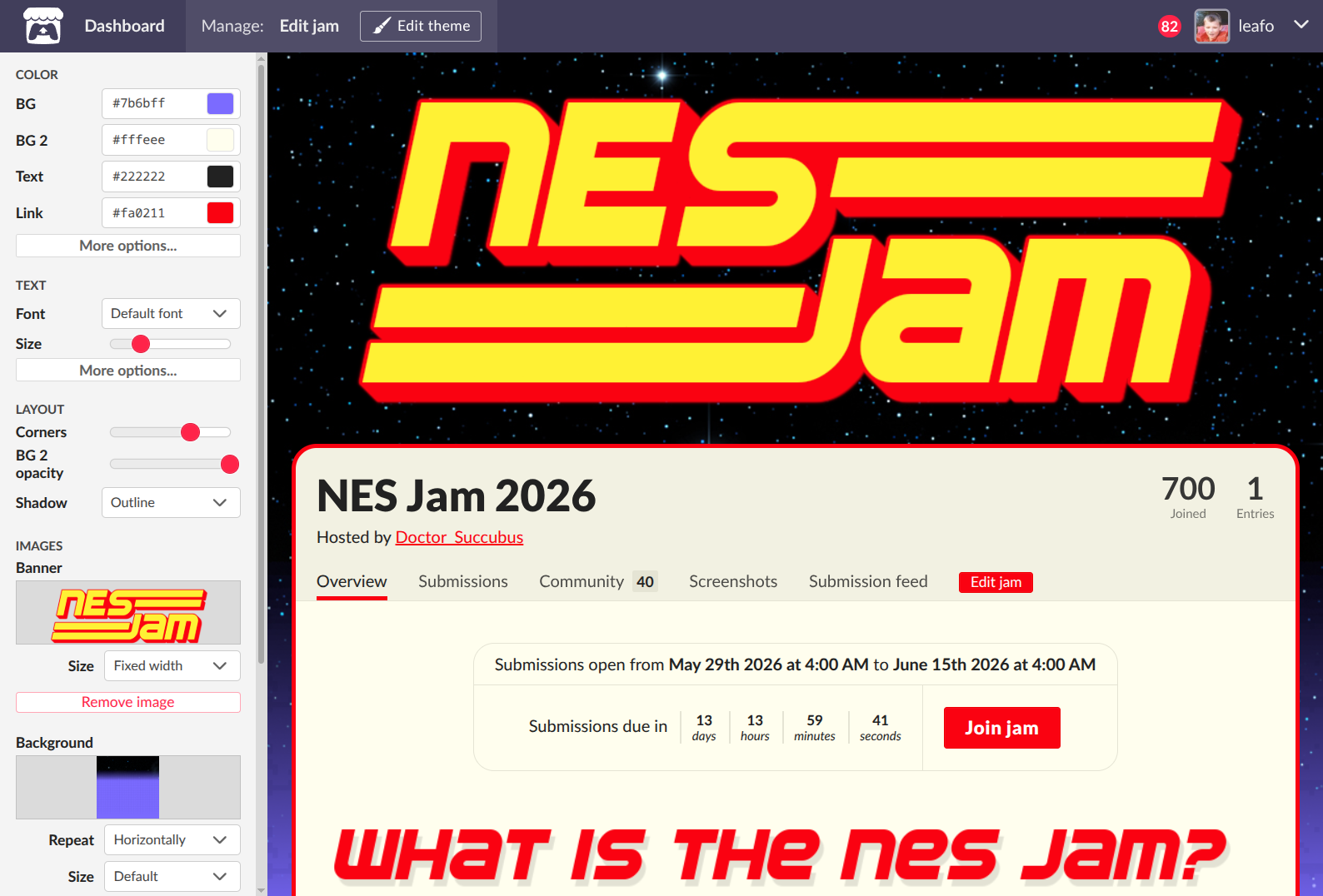
image.png

Here’s what’s in this update:

New theme options

  • Fonts! - You can now set a font family using the Google Fonts selector for the body text, and also apply a secondary font to headers on the page
  • Font size - You can use a free range slider to adjust the text sizing across the page. We’ve found that many Google fonts can have different baseline sizes, so the font size slider will let you get the spacing you’re looking for
  • Button color - optional color that can be set independently from the link color
  • Header color - optional color that can be set independently from the regular text color
  • Corner radius - You can apply rounded corners to the main content area
  • Shadow presets - We added a few shadow presets for the main page container for basic shadows, outline or glow effects based on your theme’s colors
  • Background image - Added size cover & contain options, added fixed position option
  • Opacity slider on the main content area - Fade the background of the main content area so that your page background can show through

Copy and paste themes!

You can now copy your theme as a JSON text string, and paste it into other jams. This will enable hosts who do many recurring jams to quickly get their new jam page styled.

Note: This will not copy the images currently, it only copies all theme field values, CSS, and image properties. You will need to re-upload images.

CSS Guide updated for jams

We’re codifying some of the elements on the page for custom CSS users. We’ve added a new section outlining the jam page layout, with some considerations and recommendations: https://itch.io/docs/creators/css-guide#jam-page-layout

Admin

Your account has been reviewed and is now eligible for indexing.

Thanks

Admin

Your account has been reviewed and your posts are now eligible for indexing.

Thanks

Admin

Account has been reviewed, thanks.

Admin

Please do not create fraud accounts to rate your jam entries, you will be permanently banned from itch.io.

Pinned ReplyAdmin

You don’t even have any screenshots for your game, just an AI generated cover image. I hardly see how this passes our quality guidelines https://itch.io/docs/creators/quality-guidelines

Please don’t make urgent requests of the staff if you aren’t even willing to put in the minimum effort for your game page.

Admin (1 edit)

There’s already a filter option sidebar on the https://itch.io/game-assets page
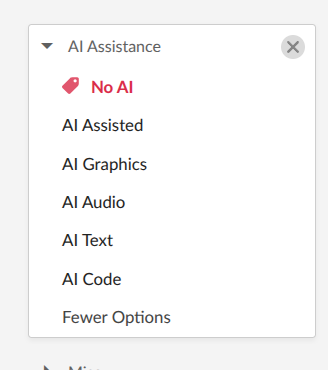
image.png

I understand the options for filtering on the search page are very limited right now but hope to address that soon.

Admin

I think this is one area that we probably won’t prioritize addressing.

I think being able to check your own history is a good use case though, so I would recommend doing a data export to see all your comments: https://itch.io/user/settings/data-export

Pinned ReplyAdmin

Our analytics service was backlogged due to a bug. The issue has been resolved, but because this is a 7day aggregate metric it may take some time before it shows up again in your dashboard.

Thanks

Admin

Sorry about that, taking a look right now.

Admin

Your account was flagged for review but it has been reviewed and is not eligible for indexing.

I notice that your pages are very sparse, please review the content creator quality guidelines here: https://itch.io/docs/creators/quality-guidelines

Thanks

Admin

Account was flagged for human review. It has been reviewed and your page is eligible for indexing again.

Thanks

Admin

We followed up

Admin

Your previous topic got closed, please do not create a new topic. If you have anything to add to the case you can reply to the support threads you already have with staff.

A quick look at your page suggests you have characters that are designed to look very young. Our staff considers intent when reviewing a page, so just because you write a disclaimer “This character is of legal age” does not make you immune to our moderation policies around adult content.

Thanks

Admin (1 edit)

Your account has suspended for blatant violation of our adult content policies. Any outstanding funds on the accounts balance will be refunded.

Admin (1 edit)

Please avoid hijacking other people’s topics as we typically resolve the OP’s issue and close out the topic.

Admin

Please ensure you accurately tag your pages containing the output of generative AI or you will be de-indexed. We take this seriously.

https://itch.io/docs/creators/quality-guidelines#accurately-tag-your-use-of-generative-ai

Admin

Thanks for reaching out. I noticed that you’re a brand new account that has already created over 10 project pages full of AI generated assets.

Keep in mind that we may delay or deny indexing if we feel like mass-produced generative content is being uploaded.

https://itch.io/docs/creators/quality-guidelines#avoid-uploading-excessive-amounts-of-automatically-generated-or-ai-generated-content

Thanks

Admin

We left you a follow-up